
This one can be easy to miss, but it can change your logic in a silent way. SET and SELECT look similar when assigning a variable, but they do not behave the same in all cases. The difference appears when the subquery returns no rows. With SELECT @var = ...the variable keeps its previous value. With SET @var = (SELECT ...)the variable becomes NULL.
I tested it with a very small demo below. The query searching for Id = 4 returns no row, because the table has only 1,2,3. After that, SELECT leaves @Id as 10, while SET changes it to NULL.
DROP TABLE IF EXISTS #tmp
CREATE TABLE #tmp
(
    Id INT NOT NULL PRIMARY KEY
)

INSERT INTO #tmp (Id)
SELECT *
FROM (VALUES (1), (2), (3)) a(n)

DECLARE @Id INT

SET @Id = 10

-- SELECT
SELECT @Id = Id FROM #tmp WHERE Id = 4

SELECT @Id AS [SELECT]

-- SET
SET @Id = (SELECT Id FROM #tmp WHERE Id = 4)

SELECT @Id AS [SET]
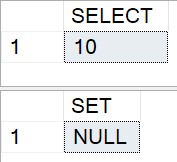
Result in this test: SELECT gives 10, SET gives NULL. So if “not found” should keep the old value, SELECT assignment can be useful. If “not found” should explicitly reset the variable, SET it gives you that behavior directly.